
Postscript helps you build strong customer relationships across the entire buying experience - all via SMS! You can install Postscript from our website or from the Shopify App Store.
With Postscript, you can:
Convert your site visitors into subscribers by easily growing your SMS subscriber list with TCPA-compliant popups, opt-in links, social media, and more.
Target specific subsets of subscribers based on location, engagement, behavior, and purchase history—and drive traffic and sales through strategic offers.
Create great experiences by delivering high-quality support on your customers' preferred channel.
In this article, we discuss how to install Postscript and access it within your Shopify Admin.
Install from Shopify App Store or Postscript Website
Shopify App Store
Search for Postscript in the Shopify App Store.
Select Postscript SMS Marketing from the options listed. Then, select the green Add App button.
If you're already logged into your Shopify store, you'll go directly to the Add App page. Otherwise, you may be prompted to log into your store.
Select the green Add Sales Channel button in the upper-right corner of the page.
Shopify will reroute you to Postscript's Sales Channel landing page in your Shopify admin. Select the green Create Your Postscript Account button.
Shopify will direct you straight to your Postscript dashboard, where your Postscript Onboarding wizard will launch.
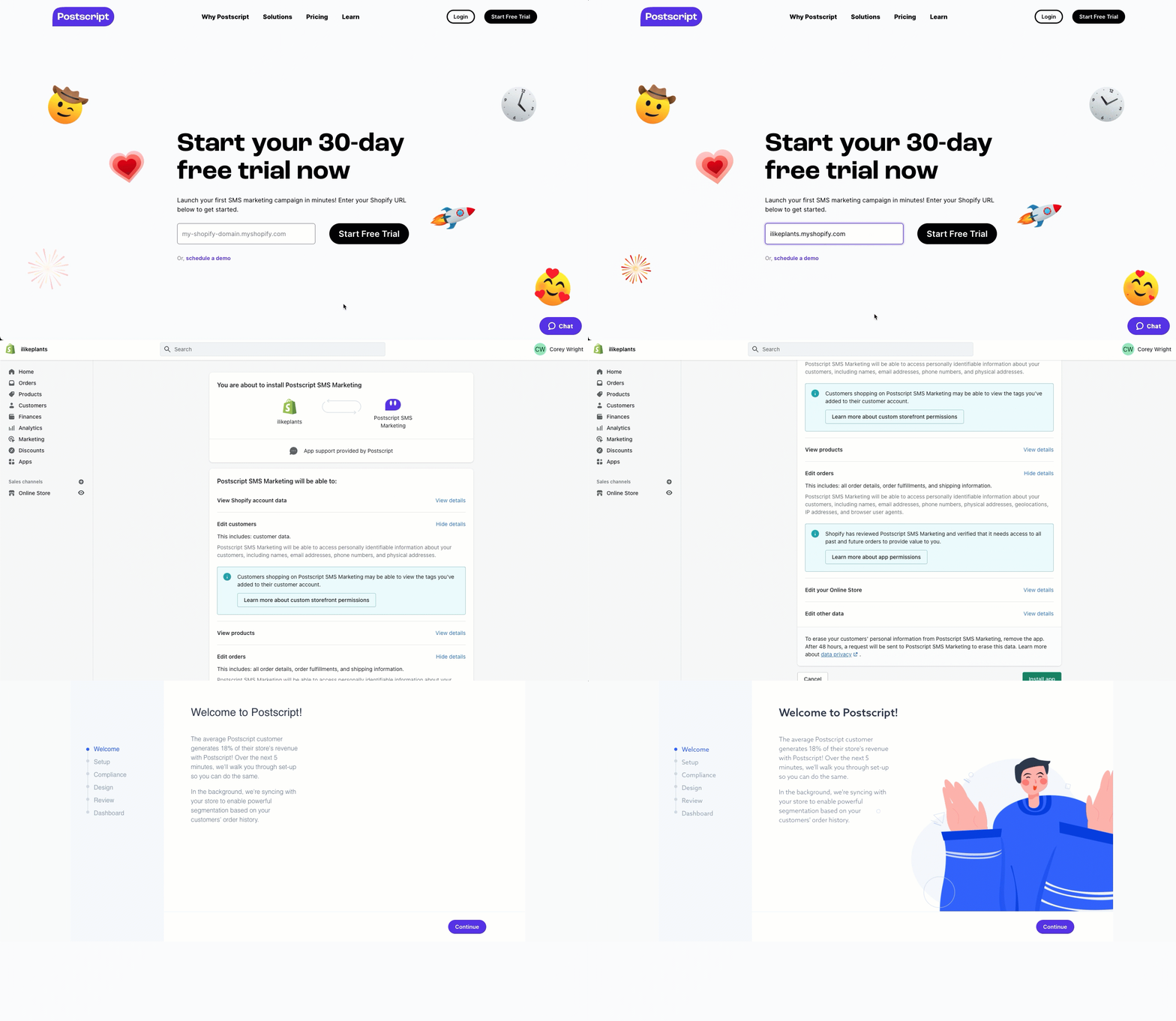
Postscript Website
Enter your Shopify domain on the Postscript website, then select Start Free Trial.
If you're already logged into your Shopify store, you'll go directly to the Add App page. Otherwise, you may be prompted to log into your store.
Select the green Add Sales Channel button in the upper-right corner of the page.
Shopify will reroute you to Postscript's Sales Channel landing page in your Shopify admin. Select the green Create Your Postscript Account button.
Shopify will direct you straight to your Postscript dashboard, where your Postscript Onboarding wizard will launch.
Once installed, Postscript may take up to 15 minutes to sync with your store. The total time will depend on the size of your store.
Accessing from Shopify Admin
From the "Apps" Section
Navigate to your Shopify Admin. On the left-hand navigation bar, select Apps.
Search for Postscript and select Postscript SMS Marketing.
Select the green Go to Your Postscript Dashboard button to be redirected to the Postscript app.
From the "Sales Channel" Section
Navigate to your Shopify Admin.
On the left-hand navigation bar, select Sales Channels.
Postscript should appear on the dropdown under Installed Apps. If Postscript does not appear, search Postscript and select Postscript SMS Marketing.
Select the green Go to Your Postscript Dashboard button to be redirected to the Postscript app.
Accessing from Postscript Website
Go to the Postscript login page.
Select Or Login With Email.
Enter the email address tied to your Postscript account and your password.
If you don't remember your password, select Forgot Password and follow the prompts to reset it.
Get Support
Have questions? Please feel free to reach out to our Support team at [email protected] or via live chat.
Need ongoing channel strategy guidance? Please fill out this form and we'll connect you to one of our certified partners.